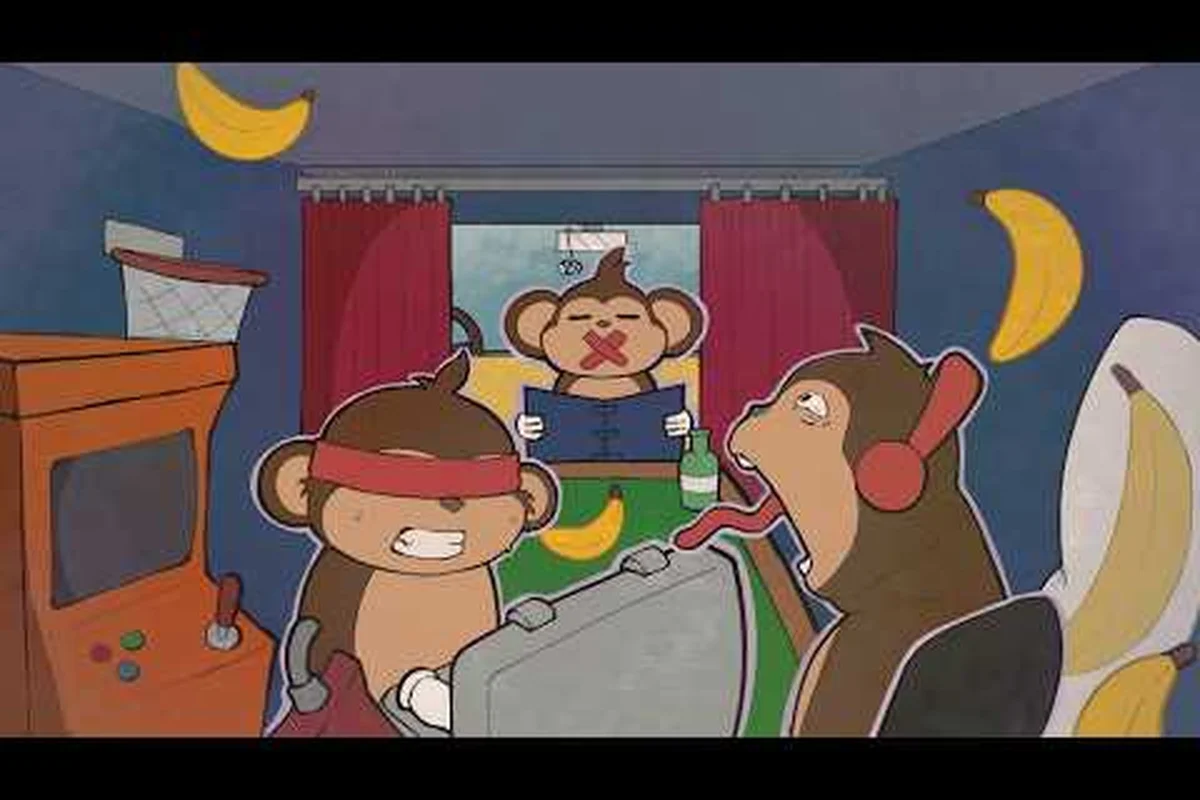
If you have not yet wrapped your head around BOMBANANA, the three-player cooperative bomb-defusal party game that took the indie scene by storm, this BOMBANANA game overview will walk you through everything that matters before your first defusal attempt. The core hook is brutally simple: three monkeys — one blind, one deaf, one mute — must work together to defuse a ticking bomb inside a cramped minivan workshop, and if they fail, everyone goes BOOM. Because each monkey holds a different piece of the puzzle and communicates through a different handicap, the game transforms basic puzzle-solving into a chaotic exercise in trust, timing, and shouted instructions.
The reason this matters goes beyond the meme potential: BOMBANANA has earned an Overwhelmingly Positive rating from over five thousand reviews on its free demo, which means the formula genuinely works. Whether you are planning to jump in at the September 2, 2026 full release or you already downloaded the demo, understanding the role system, the communication constraints, and the module logic ahead of time will save you from the most common first-session failures. This guide covers the role mechanics, the control scheme, the bomb modules, and the strategies that separate successful squads from smoking craters. Once you’ve internalized these fundamentals, the fastest way to turn that knowledge into a flawless defusal is to drill the exact step-by-step procedures and timing windows for each bomb type, which is why we’ve compiled the full breakdown in our Bombanana Manual Guide.
BOMBANANA how the game works: the three-monkey role system
The blind monkey's tactile verification loop: cross-checking the mute monkey's callouts
The blind monkey cannot see the bomb, but can touch it, creating a verification loop against the mute monkey's manual readings. When the mute monkey reads "cut the third wire, blue," the blind monkey physically traces the wire positions and confirms the count aloud — a step that prevents the common "off-by-one" error when wires are bundled tightly. The demo's 97% positive rating (5,066 reviews) suggests this tactile cross-check is intuitive, but the Hot Fix's "mute player blurry vision issue" fix indicates visual clarity was a launch pain point. Teams that skip this verification step typically fail modules requiring precise positional memory, especially under the 60-second default timer.
The Free Mode module designer: building custom bombs to train role-specific weaknesses
Free Mode, available in the demo, lets players design their own bombs — a training tool that directly addresses asymmetric role weaknesses. A blind monkey struggling with memory modules can build a bomb with 5 memory modules and no other puzzle types, forcing focused practice on that single mechanic. The mute monkey can use Free Mode to rehearse manual navigation by designing bombs that require rapid page-flipping between the Calculation Module and wire-sequence pages. Since the demo runs on Windows and macOS, teams can practice cross-platform before the September 2, 2026 full release. This mode effectively functions as a role-specific bootcamp, compressing what would take 20+ random matches into 10 minutes of targeted repetition.
The entire foundation of BOMBANANA how the game works rests on its asymmetric role design, where each of the three players controls a monkey with a specific sensory or communication impairment. According to the official Steam store page, the mute monkey cannot speak, the blind monkey cannot see the bomb, and the deaf monkey cannot hear the audio cues that the other two rely on. This creates a situation where no single player has complete information, which forces constant verbal coordination and careful division of responsibilities.
The mute monkey is the only one who can see the bomb clearly, but they cannot communicate verbally with the team. They must use gestures, pointing, and physical positioning to guide the others, which often leads to hilarious misinterpretations when the timer is low. The blind monkey can talk freely and hear everything, but they cannot see the bomb itself, so they depend entirely on the mute monkey's non-verbal direction and the deaf monkey's descriptions. The deaf monkey can see and speak but cannot hear the audio cues that indicate module states, button presses, or the bomb's internal feedback, which means they often miss critical confirmation sounds that the other two take for granted.
Each role brings a distinct challenge to the table, and the game deliberately prevents any single player from carrying the team. The communication loop works like a game of telephone with extra steps, and the tension ramps up because the bomb timer does not pause while you argue about which wire to cut. Community reports from the official Discord server suggest that teams who establish clear role-specific callouts before the round starts succeed far more often than groups who improvise under pressure.
| Role | Can See Bomb | Can Speak | Can Hear Audio Cues | Primary Responsibility |
|---|---|---|---|---|
| Mute Monkey | Yes | No | Yes | Visual guidance, pointing, demonstrating module states |
| Blind Monkey | No | Yes | Yes | Verbal coordination, relaying instructions, asking clarifying questions |
| Deaf Monkey | Yes | Yes | No | Reading visual indicators, confirming module states, physical manipulation |
The role assignment happens at the start of each round, and while the game does not currently offer a role preference system, teams can rotate roles between rounds to keep the experience fresh. Players who have spent time with the demo report that mastering all three roles makes you a significantly better teammate, because you understand what information each player actually has access to. The asymmetric information design is the heart of the game, and it rewards squads who develop a shared vocabulary for describing bomb states, wire colors, and module positions.
BOMBANANA controls guide: keybinds and interface basics
Before you can defuse anything, you need to know how to move your monkey around the minivan workshop and interact with the bomb components. This BOMBANANA controls guide covers the default keybinds, the interaction system, and the interface elements that appear on screen during a defusal attempt. The game uses a straightforward first-person control scheme that most players will find familiar within minutes, but the real challenge comes from performing precise actions while communicating with your team.
The default keybinds follow standard FPS conventions, with WASD handling movement, the mouse controlling your view, and E serving as the primary interact button for pressing buttons, toggling switches, and picking up tools. Shift enables a sprint that helps you move between the bomb and the manual quickly, while C crouches to reach lower modules. The Tab key opens the manual, which contains the reference pages you need to solve each module type, and Q cycles through your available tools when a module requires a specific implement.
Voice chat is the lifeline of the game, and the default push-to-talk binding is V, though you can remap it to any key that feels comfortable. The game also includes a quick-chat wheel bound to G, which lets you send preset phrases like "wire red" or "need help" when you cannot speak or when the chaos makes verbal communication impossible. The emote wheel on B lets you perform gestures that the mute monkey relies on heavily, including pointing, nodding, shaking your head, and waving your arms in exaggerated panic.
| Action | Default Keybind | Notes |
|---|---|---|
| Move | WASD | Standard FPS movement |
| Interact | E | Press buttons, toggle switches, grab tools |
| Sprint | Shift | Faster movement, useful for reaching the manual |
| Crouch | C | Reach lower modules and tight spaces |
| Open Manual | Tab | Reference pages for module solutions |
| Push-to-Talk | V | Voice chat, remappable in settings |
| Quick Chat Wheel | G | Preset phrases for non-verbal communication |
| Emote Wheel | B | Gestures, critical for the mute monkey |
The interface keeps things minimal, with the bomb timer displayed prominently at the top of the screen and the module status indicators shown as small icons near the bomb. The manual pages appear as a separate overlay when you press Tab, and you can flip through them with the mouse wheel or the A and D keys. The hotfix notes from the official Steam news page mention that the developers fixed an issue where the emote wheel texture could get stuck, so the current build should handle gesture inputs cleanly.
BOMBANANA module logic: understanding the bomb components
The mute monkey's manual-only information channel: why the Calculation Module page must stay error-free
The mute monkey is the only role that can read the manual, making the Calculation Module page the team's single source of truth for arithmetic-based puzzles. The Hot Fix patch (September 2026) explicitly corrected "wrong information in the Calculation Module page," meaning pre-patch teams may have been solving with incorrect formulas. In practice, a mute monkey should read the page aloud twice — once for the deaf monkey to hear, once for the blind monkey to confirm via touch — before any wire is cut. A single misread digit on a calculation module can cascade into a full team wipe, since neither the blind nor deaf monkey can independently verify the manual's contents.
The deaf monkey's audio-dependent callouts: translating bomb sounds into defusal actions
The deaf monkey is the only role that can hear the bomb's internal mechanisms, making audio callouts critical for timing-sensitive modules. The Hot Fix addressed "voice chat delay issue," which directly impacts the deaf monkey's ability to relay audio cues in real-time — a 0.5-second delay can mean the difference between defusing and detonation on modules with tight reaction windows. In practice, the deaf monkey should describe sounds in absolute terms ("high-pitched beep, repeating every 2 seconds") rather than relative terms ("it's beeping faster now"), because the mute monkey must translate these into manual instructions and the blind monkey into physical actions. The official Discord community (discord.gg/bombanana) maintains a callout glossary that standardizes these sound descriptions across teams.
Every bomb in BOMBANANA consists of a series of modules that must be solved in sequence, and each module type follows its own internal logic that you must decipher using the manual. The manual pages are randomized per bomb, which means you cannot memorize the solutions ahead of time, and the information you need is always distributed across the team. The demo features several module types, including the wire module, the button module, the calculation module, and the keypad module, each with distinct rules and failure conditions.
The wire module presents a set of colored wires that must be cut in a specific order, and the manual page for this module contains a decision tree based on wire colors, positions, and the presence of parallel wires. The button module requires you to hold the button for a specific duration and release it at the right moment, with the manual indicating whether to hold or tap based on the button's color and the text printed on it. The calculation module asks you to solve a simple arithmetic problem using values displayed on the bomb, and the manual page explains how to interpret the symbols and apply the correct formula.
The keypad module displays a set of symbols that must be pressed in a specific order, and the manual page shows the full symbol hierarchy so you can determine the correct sequence. The hotfix notes mention that the developers corrected wrong information in the calculation module page, which suggests that the manual content receives active maintenance and that players should trust the current build over older community guides. Each module has a strike limit, and accumulating too many strikes causes the bomb to detonate immediately, so careful reading and clear communication are essential.
| Module Type | Core Mechanic | Key Information Needed | Common Failure Mode |
|---|---|---|---|
| Wire Module | Cut wires in specific order | Wire colors, positions, parallel wires | Cutting the wrong wire due to miscommunication |
| Button Module | Hold and release at the right time | Button color, printed text, timer position | Releasing too early or too late |
| Calculation Module | Solve arithmetic using displayed values | Symbol meanings, formula from manual | Misreading symbols or applying wrong formula |
| Keypad Module | Press symbols in correct order | Symbol hierarchy from manual | Pressing symbols out of sequence |
The module logic rewards careful reading over speed, and teams that rush through the manual pages often miss critical details that lead to strikes. Community testing suggests that the calculation module trips up the most teams because the symbols can look similar under pressure, and the deaf monkey often cannot confirm whether a button press registered without the audio cue. The manual reading strategy matters as much as the module solving itself, because the mute monkey cannot read the manual aloud and the blind monkey cannot see the pages, which means the deaf monkey usually takes on the role of manual reader and verbal guide.
BOMBANANA keybinds optimization: setting up for success
While the default controls work well for most players, optimizing your BOMBANANA keybinds can significantly improve your reaction time and communication efficiency during high-pressure defusal attempts. The game allows full remapping of all actions, and players who invest a few minutes in customization often find that they can perform complex sequences more reliably. The keybind optimization process starts with identifying which actions you use most frequently and ensuring they sit within easy reach of your movement keys.
For most players, moving the push-to-talk binding from V to a mouse side button frees up your left hand for movement and interaction, which becomes critical when you need to speak while simultaneously manipulating a module. The quick chat wheel on G works well for the mute monkey, but some players prefer to bind individual quick chat phrases to number keys for faster access. The manual toggle on Tab is well positioned, though players who find themselves constantly flipping between the bomb and the manual might benefit from binding it to a more accessible key.
The emote wheel on B is essential for the mute monkey, and binding it to a mouse button or a key near your movement fingers can make gesture communication much smoother. Players who use the deaf monkey role often report that they rely heavily on the sprint key to move between the bomb and the manual, so keeping Shift as the sprint binding works well for most setups. The game also supports controller input, and players who prefer gamepads can assign the interaction and communication actions to the face buttons and shoulder buttons respectively.
| Optimization | Default | Recommended | Why It Helps |
|---|---|---|---|
| Push-to-Talk | V | Mouse Side Button | Frees left hand for movement and interaction |
| Emote Wheel | B | Mouse Side Button or Q | Faster gesture access for mute monkey |
| Quick Chat | G | Number Keys 1-4 | Individual phrases accessible without opening wheel |
| Manual Toggle | Tab | Caps Lock or Mouse Thumb | Faster flipping between bomb and reference pages |
The keybind configuration screen also lets you adjust mouse sensitivity, which matters because precise cursor placement is required for some module interactions. Players who find themselves overshooting buttons or struggling to align the cursor on small switches should lower their sensitivity slightly, while players who need to move quickly between distant modules might prefer a higher setting. The sensitivity tuning process is personal, and the best approach is to test different values in the free demo before committing to a configuration for the full release.
BOMBANANA team strategies: communication frameworks that work
The difference between a successful defusal and a spectacular explosion often comes down to the communication framework your team uses, not individual skill. This section covers the team strategies that experienced players have developed through community testing, and the patterns apply regardless of which role you play. The core principle is that every piece of information should have a designated owner, and every action should be confirmed before execution.
The most effective teams assign the deaf monkey as the primary manual reader, because they can see the bomb and speak freely, which makes them the natural bridge between the mute monkey's visual guidance and the blind monkey's verbal coordination. The mute monkey focuses on pointing and demonstrating module states, using the emote wheel to indicate which module needs attention and what action should be taken. The blind monkey serves as the coordinator, asking clarifying questions, relaying instructions, and keeping track of the overall bomb state.
The callout structure matters more than the specific words you use, and teams that develop a consistent vocabulary for describing wire colors, button states, and module positions succeed more consistently. For example, always describing wires by color and position ("red wire, third from the left") reduces confusion compared to vague descriptions like "the red one." The confirmation loop is equally important, and every action should be announced before execution and confirmed after completion, which prevents the common failure mode of someone cutting the wrong wire because they misunderstood an instruction.
The time management strategy involves deciding early whether to prioritize speed or accuracy, because some bombs have generous timers while others demand rapid execution. Teams that rush often accumulate strikes from careless mistakes, while teams that move too slowly run out of time on the final modules. The best approach is to solve the easiest modules first to build confidence and reduce the remaining workload, then tackle the complex modules with the full team's attention focused on the manual pages.
The practice routine recommended by community veterans involves running the same bomb multiple times with the same team, because repetition builds the shared vocabulary and trust that makes communication faster. The free demo includes a Free Mode where you can design your own bomb, which provides an excellent sandbox for practicing specific module types without the pressure of a random bomb. Teams that spend even thirty minutes in Free Mode before attempting random bombs report significantly higher success rates on their first few runs.
Frequently Asked Questions
What is the BOMBANANA game overview for new players?
The BOMBANANA game overview explains the core mechanics of the three-player cooperative bomb-defusal game, including the mute, blind, and deaf monkey roles, the communication constraints, and the module-solving logic. New players should understand the role system before their first match, because each monkey holds different information and the game requires constant verbal coordination to succeed.
How does the mute monkey communicate in BOMBANANA?
The mute monkey cannot speak, so they rely on the emote wheel, gestures, pointing, and physical positioning to guide their teammates. The game includes a dedicated emote system with preset animations that let the mute monkey indicate which module needs attention, demonstrate actions, and express urgency. The deaf monkey and blind monkey must learn to read these non-verbal cues quickly.
What are the best BOMBANANA keybinds for the deaf monkey role?
The deaf monkey benefits from keeping push-to-talk on an easily accessible key, because verbal communication is their primary contribution. Many players recommend binding push-to-talk to a mouse side button and keeping the manual toggle on Tab for quick reference. The deaf monkey should also prioritize sprint access for moving between the bomb and the manual.
Can you play BOMBANANA with only two players?
BOMBANANA is designed for exactly three players, and the role system requires all three monkeys to function. The game does not currently offer a two-player mode or bot companions, so you need a full squad to play. The official Discord server is a good place to find teammates if your regular group is short a player.
Is the BOMBANANA demo free to play?
Yes, the BOMBANANA demo is free on Steam and holds an Overwhelmingly Positive rating from over 5,000 reviews. It includes all core module types, voice chat, and Free Mode for custom bomb design. Your demo progress carries over to the full release on September 2, 2026.